
version 3 of sample studio layer
free update for sample studio user
V2>V3:
new sample engine
grid trigger mode
changed effect path
added lfo for controlling effect params
improved cpu usage
Signal Path

Demo Track
[soundcloud url=”https://api.soundcloud.com/playlists/204586418″ params=”auto_play=false&hide_related=false&show_comments=true&show_user=true&show_reposts=false&visual=true” width=”100%” height=”300″ iframe=”true” /]
Sample Import

drag and drop your sample files to number field 1 to 8.
Sample Slot

Parameters:
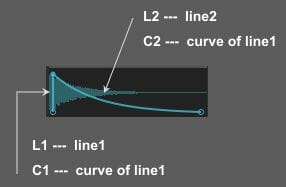
Example:

If you set line and curve values like above,
sample will be playbacked normally.

If you set line and curve values like above,
sample will be playbacked reversely.
CF = filter cutoff frequency
Spd = sample playback speed
Pan
Vol = voluyme
“–, LP, BP, HP” = filter type, “–” is bypass
“Prev” = sample preview button
“R C” = randomize/clear sample slot parameters
Slider Window

You can also control slot parameters here.
Timing = triggering timing shift
Probability = triggering probability(0 to 100%)
FX = dry/wet balance of sample slot output
“R C” = randomize/clear slider value
Sample Triggering
There are 3 ways to trigger loaded samples.(trigger button, grid seq, midi input)
Trigger Button

by clicking “TRIG” button, you can trigger all loaded samples.
Grid Sequencer


Clicking “Grid” tab, grid seq window will be appeared.
You can trigger loaded samples by grid sequencer.
On/Off = sequencer on/off
“> < >< R” = seq running directions
Speed = seq speed
Size = seq step size
Midi Trigger
You can trigger loaded samples by midi note input.

Clicking “MIDI” button midi input setting window will be pop-up.

In this case, note C triggers all samples.
note C# triggers sample of slot2,
note D triggers sample of slot3,
and so on…
Effect

Filter:
“LP BP HP” = filter type
CF = cutoff freq
Reso = resonance
LFO = amount of lfo to cf(0 to 100%)
Comb:
Delay = delay time
FB = feedback
LFO = amount of lfo to delay time(0 to 100%)
Tremolo:
Waveform = modulation waveform
Rate = modulation speed
Depth = modulation depth
Delay:
Time = delay time
FB = feedback
Mix = dry/wet balance
LFO = amount of lfo to delay time(0 to 100%)
Reverb:
Size = Room Size
Dec = decay time
Damp = hi damp
Mix = dry/wet balance
Output:
Wid = stereo width
Gain
Vol
LFO

MenuBox = lfo waveform
“Sync” = lfo speed sync switch
Rate = lfo speed
go to product page